Exchange On-Premise vs Microsoft 365: Cost Comparison (Singapore 2026 Guide)

What SMEs Really Pay, And Why It Matters
For years, many Singapore SMEs relied on Microsoft Exchange on-premise servers to manage business email.
But in 2026, the conversation has shifted. The real question is no longer “Which is cheaper?”, it’s which option delivers better long-term value, reliability, and security?
Because while on-premise may appear cheaper upfront, the hidden costs often tell a different story.
This guide breaks down the true cost comparison between Exchange on-premise and Microsoft 365, so you can make a smarter business decision.
Quick Summary: The Real Difference
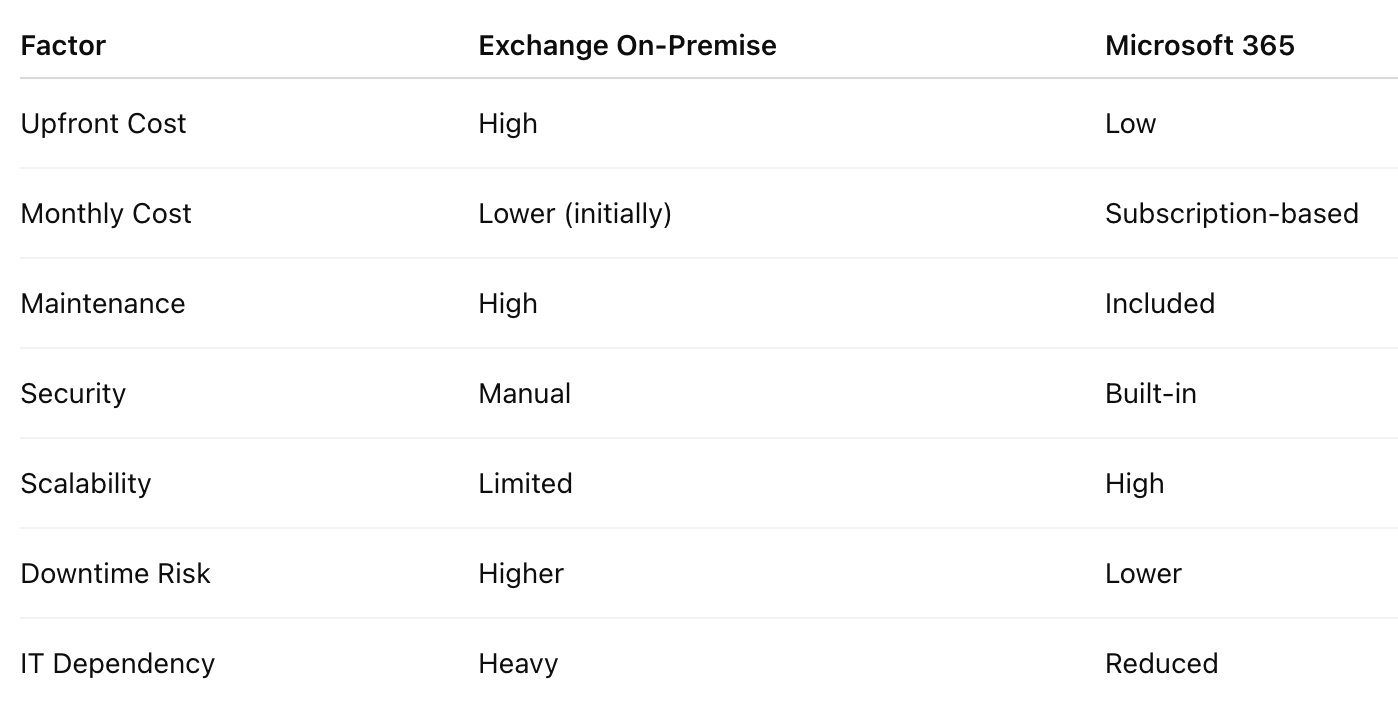
The True Cost of Exchange On-Premise
Many SMEs underestimate how much on-premise email actually costs over time. Let’s break it down.
1. Hardware & Infrastructure Costs
Running Exchange on-premises requires:
Physical server hardware
RAID storage systems
Backup systems
UPS (power protection)
Cooling and rack space
Typical Cost (Singapore SMEs)
Server hardware: SGD $4,000 – $10,000
Backup system: SGD $1,500 – $5,000
Networking upgrades: SGD $1,000 – $3,000
These are upfront costs, not including maintenance.
2. Software Licensing Costs
You’ll need:
Windows Server license
Exchange Server license
Client Access Licenses (CALs) per user
Estimated Cost
Exchange + CALs: SGD $100–$200 per user
Server OS license: SGD $1,000+
3. IT Maintenance & Support
This is where costs quietly increase. You’ll need ongoing support for:
Patching and updates
Security monitoring
Backup management
Server health checks
Troubleshooting
Typical Cost
SGD $500 – $2,000/month (outsourced IT or internal staff time)
4. Downtime & Business Impact
This is often ignored, but critical. So if your server goes down:
Email stops
Operations slow
Staff productivity drops
Customer communication is affected
Even 1 - 2 hours of downtime can cost more than monthly cloud subscriptions.
5. Security & Risk Costs
On-premise systems are more vulnerable if not properly maintained. Risks include:
Ransomware attacks
Email breaches
Data loss
Compliance failures
Fixing a breach can cost tens of thousands, far more than prevention.

The Real Cost of Microsoft 365
Now let’s look at Microsoft 365.
1. Subscription Pricing
Microsoft 365 operates on a per-user monthly model. Typical Pricing (Singapore 2026)
Business Basic: ~$8–$10/user/month
Business Standard: ~$15–$20/user/month
Business Premium: ~$25–$30/user/month
2. What’s Included (This Is Key)
Unlike on-premise, Microsoft 365 includes:
Email hosting (Exchange Online)
Spam and threat protection
Automatic backups (platform-level)
Microsoft Teams
OneDrive & SharePoint
Continuous updates
High availability infrastructure
3. Reduced IT Overhead
You don’t need to:
Maintain hardware
Monitor server uptime manually
Handle patching cycles
Troubleshoot hardware failures
Your IT team (or provider) focuses on optimisation, not firefighting.
4. Built-In Security Value
Microsoft 365 includes:
Multi-Factor Authentication (MFA)
Anti-phishing protection
Conditional access policies
Data Loss Prevention (DLP)
These would cost extra in on-premise environments.
3-Year Cost Comparison (Realistic Scenario)
Let’s compare a 30-user SME in Singapore. Exchange On-Premise (3-Year Estimate)
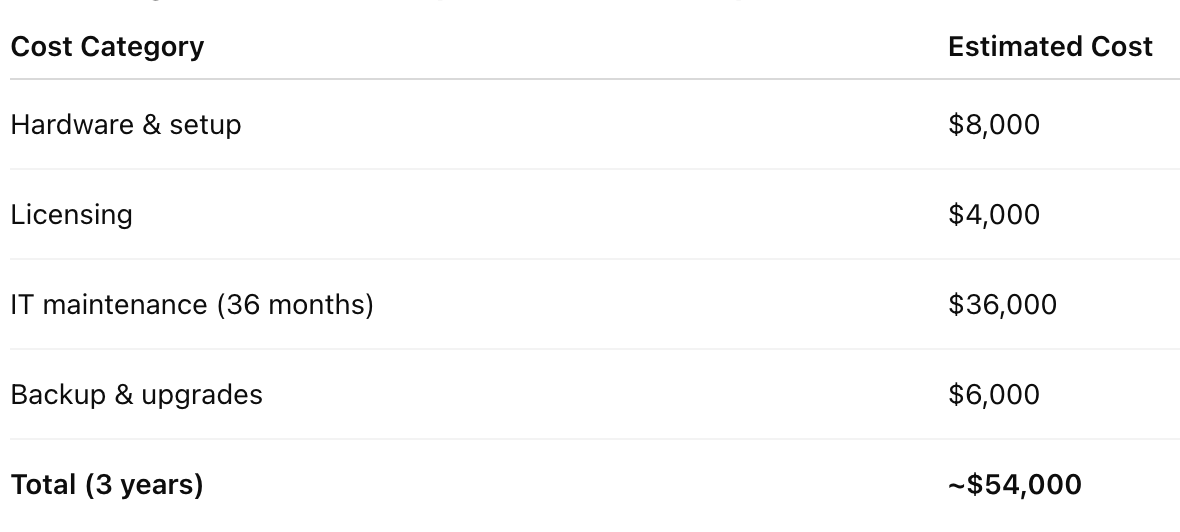
Microsoft 365 (3-Year Estimate) - Assuming Business Premium (~$25/user/month):
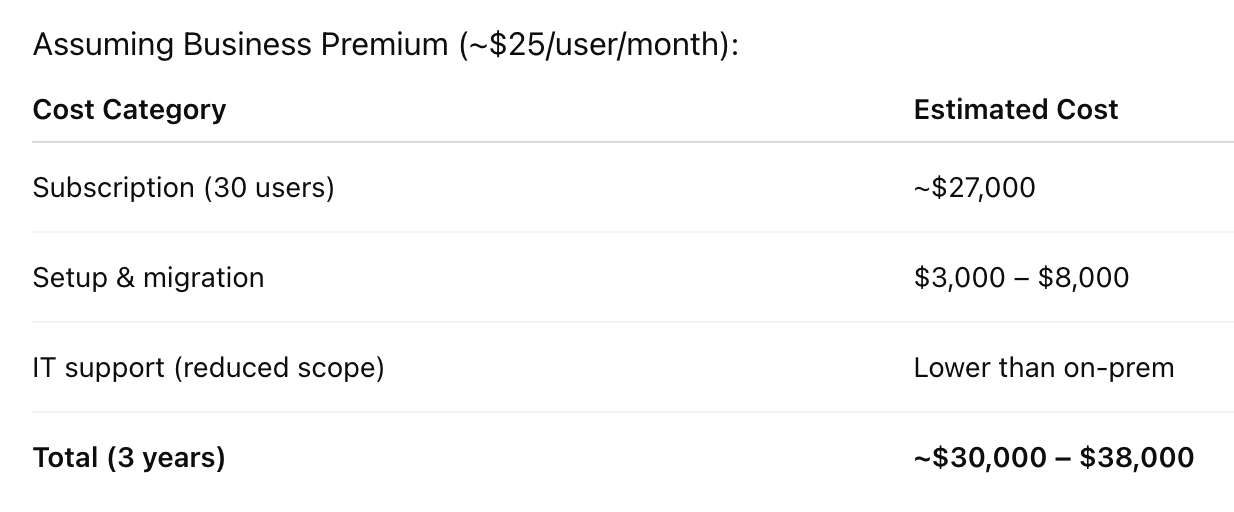
Key Insight
On-premise may look cheaper initially…
But over 3 years, Microsoft 365 is often more cost-efficient
And significantly more secure and reliable
Beyond Cost: Why SMEs Are Moving to Microsoft 365
Cost is just one factor. Businesses switch because of:
Reliability: Microsoft guarantees uptime across its global infrastructure.
Scalability: Add or remove users instantly.
Remote Access: Work securely from anywhere.
Compliance: Better alignment with PDPA requirements.
Productivity: Integrated tools (Teams, SharePoint, Outlook).
When Should You Move?
You should consider migrating if:
Your server is older than 4–5 years
Maintenance costs are increasing
You’ve experienced downtime
You’re expanding to multiple locations
Security concerns are rising
Remote work is required
At this stage, staying on-premises becomes a liability.
Migration Considerations
Migrating involves:
Email data transfer
DNS updates
User account setup
Security configuration
Staff onboarding
Done incorrectly, it can cause downtime or data issues.
This is why many SMEs engage professional Microsoft 365 migration services in Singapore to ensure a smooth and secure transition.
If you’re planning a move, you can explore the full process, risks, and planning steps in our detailed guide:
—> Microsoft 365 Migration Services in Singapore (Complete 2026 Guide)
Why Businesses Work With Advance IT
At Advance IT, we approach migration differently. We don’t just “move email.” We:
Assess your current infrastructure
Evaluate true cost vs value
Design a future-proof cloud setup
Execute structured, low-risk migrations
Configure security properly
Provide ongoing support
We work selectively with clients where we can deliver reliable, efficient, and secure outcomes.
Final Verdict

Thinking About Moving to Microsoft 365?
Before making a decision, it’s important to understand:
Migration risks
Cost breakdown
Security requirements
Implementation steps
For a complete overview, read our full guide: Microsoft 365 Migration Services in Singapore (Complete 2026 Guide)
Or speak with Advance IT for a structured assessment.
Frequently Asked Questions
Q1. What are the hidden ongoing costs of running an Exchange server on-premise for a Singapore office?
Ans. On-premise Exchange in Singapore carries high costs beyond initial hardware. Advance IT's 2026 guide highlights monthly IT maintenance of SGD 500 to 2,000, plus power, cooling, emergency repair, and licensing fees that accumulate to make on-premise meaningfully more expensive than it appears in the initial purchase decision.
Q2. Is Microsoft 365 more secure than running Exchange on-premise for a Singapore SME?
Ans. Microsoft 365 includes built-in threat protection, multi-factor authentication, and automatic security updates that most Singapore SMEs cannot match on-premise without dedicated staff. Advance IT's 2026 Singapore cost guide notes that on-premise Exchange requires separate security tooling and manual patching, increasing both operational risk and overhead compared to the cloud alternative.
Q3. How do Singapore SMEs calculate the true total cost of running an on-premise email server over five years?
Ans. True total cost includes hardware, licensing, electricity, cooling, IT labour, and unplanned repair. Advance IT's 2026 Singapore analysis breaks down Exchange on-premise TCO comprehensively, showing that SGD 6,500 to 18,000 in upfront hardware is just the start of a cost curve that grows considerably over a five-year server lifecycle.
Q4. Can Microsoft 365 support remote and hybrid teams better than an on-premise Exchange server in Singapore?
Ans. Microsoft 365 enables secure access from any device and location without VPN complexity. Advance IT's Singapore 2026 guide highlights this as one of the strongest migration arguments for Singapore SMEs with hybrid or remote teams, as on-premise Exchange requires significant additional infrastructure to match the same level of remote access flexibility.