Integrating Clinic Management Software with Secure IT Systems
A Practical Guide for Clinics in Singapore
Clinic Management Software (CMS) has become essential for streamlining everything from appointment scheduling and billing to medical records and patient communications.
But as clinics adopt or upgrade these systems, one key question often goes overlooked: How well does your clinic management system integrate with your existing IT infrastructure, and is it secure?
In 2026, with increased patient expectations, tighter PDPA regulations, and growing cybersecurity threats, clinic management system integration in Singapore is no longer just about functionality; it’s about performance, compliance, and trust.
Why Integration Matters More Than Ever
When your CMS runs in a silo, disconnected from your clinic’s hardware, network, backup systems, and cybersecurity protocols, it can lead to:
Slow system performance
Data syncing errors across departments
Manual workarounds and duplicate entries
Increased risk of data breaches
Compliance issues with MOH and PDPA guidelines
The result? More stress for your staff and more friction for your patients.
What Is Secure Clinic Management System Integration?
Clinic management system integration is the process of ensuring your CMS:
Works seamlessly with your clinic’s existing hardware, software, and workflows
Connects securely with EMRs, imaging systems, accounting software, and patient apps
Follows IT best practices for security, speed, and compliance
Integration isn’t just about connecting tools; it’s about building a stable, scalable, and secure digital foundation for your clinic.
Benefits of Proper CMS Integration in Singapore Clinics
1. Improved Workflow Efficiency
Appointments, billing, and records update in real-time
Less double data entry across platforms
Faster processing for insurance claims and lab reports
2. Enhanced Data Security & PDPA Compliance
Patient data is encrypted and securely stored
Access controls are role-based (nurse vs admin vs doctor)
Audit logs track every change, critical for compliance reviews
3. Better System Performance
No system lags or slowdowns from conflicts or poor setup
Cloud systems and local devices are optimised to work together
Less downtime and fewer technical issues
4. Patient Experience Improvements
Faster check-ins, appointments, and payments
Fewer technical delays during consultations
Integrated communication channels (SMS, email reminders, follow-ups)
Common Integration Challenges (and How to Avoid Them)
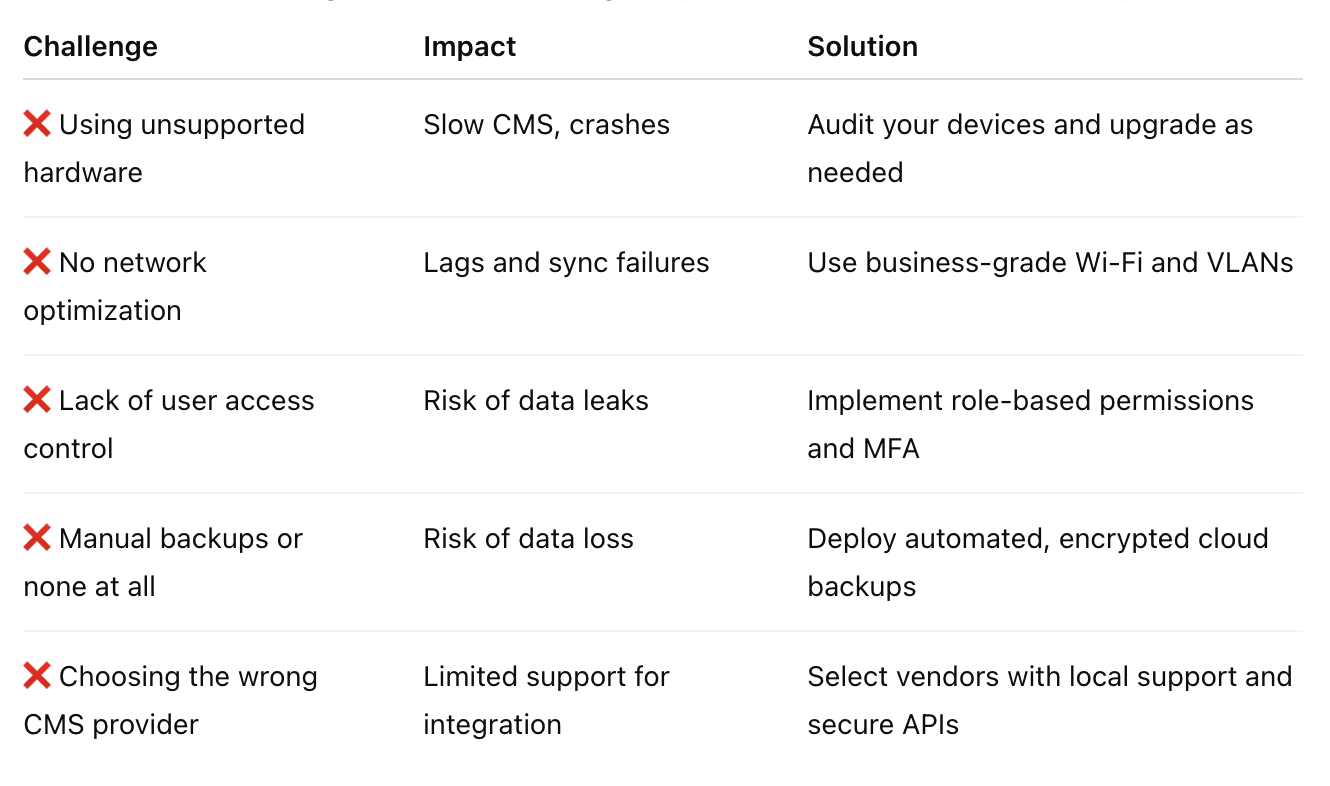
At Advance IT, we help clinics avoid these pitfalls with a full IT compatibility and security assessment before CMS rollout or upgrades.
How to Integrate CMS with Your IT Infrastructure: Step-by-Step
Step 1: Assess Your Current IT Environment
Are your systems up to date?
Can your network support real-time syncing and cloud CMS tools?
Is your firewall or security software blocking CMS features?
Step 2: Choose a CMS With Local Support & Secure Integration
Does it offer API connectivity?
Is it hosted in Singapore or in a PDPA-compliant region?
Can it work with your existing EMR, PACS, or accounting tools?
Step 3: Plan for Secure Implementation
Engage a trusted IT partner (like Advance IT)
Install with proper configurations: firewall rules, SSL certificates, role access
Set up regular backups and recovery plans
Step 4: Train Staff and Assign Roles
Create SOPs for CMS usage and escalation
Implement role-based access and strong authentication
Educate on data privacy best practices
Step 5: Monitor, Maintain, and Optimise
Track performance over time
Monitor logs and alerts
Keep both the CMS and IT systems updated
Why Security Must Be Built into Every Integration
With cyber threats rising, secure integration is critical, especially when patient data is involved.
Key Security Practices to Follow:
End-to-end encryption between devices and the cloud
Secure login with multi-factor authentication (MFA)
Firewall and antivirus protection that doesn’t block CMS features
Scheduled vulnerability scans and security patches
Secure user access policies and audit trails
Remember: if your CMS is integrated without proper cybersecurity controls, it could become a gateway for hackers, putting your data, compliance, and reputation at risk.
Why Clinics in Singapore Trust Advance IT for CMS Integration
At Advance IT, we don’t just support your CMS, we make sure it works securely, efficiently, and in harmony with your entire clinic environment.
Our Clinic IT Integration Services Include:
Full infrastructure audit before CMS deployment
Compatibility checks with imaging, EMR, and accounting tools
Secure installation and configuration
PDPA and MOH compliance checks
Staff onboarding and SOP documentation
Ongoing monitoring, helpdesk, and onsite support
Whether you’re adopting a new CMS or optimising your current one, we ensure your IT systems are future-ready, fast, and fail-proof.
Final Thoughts: Integration Isn’t Optional, It’s Operational
The future of clinic care is digital, but only if your systems work together securely.
Clinic management system integration in Singapore should never be an afterthought. Done right, it improves workflow, enhances patient care, and safeguards your clinic against disruption and non-compliance.
Planning a CMS Rollout or Upgrade?
Let’s start with a discovery call and on-site assessment.
We’ll review your current systems, identify integration gaps, and deliver a plan that aligns tech with your goals.
🔗 Book a Free Clinic IT Integration Assessment
····························································
With over 15 years of experience and a strong focus on IT support and Managed IT, we’re proud that 99.5% of our customers stay with us long-term.
‣ Website: https://www.advanceit.sg/
‣ Address: 8 Burn Road, #11-11 Trivex Singapore 369977
‣ Email us at: contact@advanceit.sg
‣ Call our team: +65 6592 8458