

How Cloud-Based Services (SaaS, IaaS, PaaS) Significantly Lower Infrastructure Costs
Cloud computing—through Software as a Service (SaaS), Infrastructure as a Service (IaaS), and Platform as a Service (PaaS)—has revolutionized cost savings for businesses by eliminating the need for expensive on-premise infrastructure, reducing labor costs, and improving scalability.
Companies that migrate to cloud solutions can expect cost reductions of 30-60% in IT infrastructure expenses, software licensing, and maintenance costs. Let’s explore how each cloud model directly lowers operational overhead.
1. Software as a Service (SaaS) – Eliminate Expensive Software & Maintenance
How SaaS Reduces Costs
No upfront hardware or software costs – SaaS applications run on the cloud, eliminating the need for expensive servers.
Predictable subscription pricing – Businesses pay a fixed monthly fee instead of large capital expenditures (CapEx).
Automatic updates & maintenance – SaaS providers handle patches, security updates, and feature upgrades, reducing IT labor costs.
Scalability – Companies only pay for what they use, avoiding unnecessary expenses.
Cost Savings with SaaS
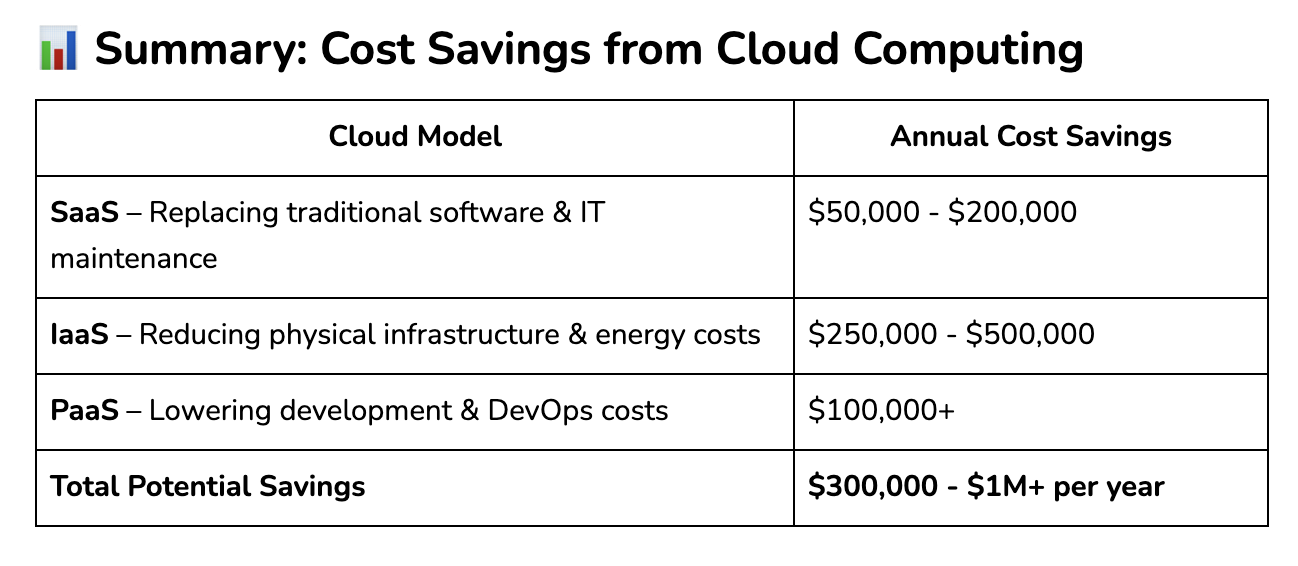
Switching from traditional software to SaaS reduces software costs by 30-50%.
No IT maintenance costs – SaaS eliminates the need for in-house software support teams, reducing labor expenses by $50,000 - $100,000 annually.
Lower licensing costs – Companies save 20-30% by replacing expensive perpetual software licenses with flexible SaaS subscriptions.
💡 Example: Instead of paying $500,000 upfront for a full-scale ERP system, a company can subscribe to SAP S/4HANA Cloud or Microsoft Dynamics 365 for $5,000 - $10,000 per month, spreading costs over time and ensuring ongoing updates.
2. Infrastructure as a Service (IaaS) – Reduce Data Center & Hardware Expenses
How IaaS Reduces Costs
No need for physical servers & storage – Eliminates upfront capital expenditures on expensive data centers.
Pay-as-you-go pricing – Businesses only pay for what they use, avoiding underutilized resources.
Lower energy & maintenance costs – Reduces power, cooling, and IT maintenance expenses.
Scalability & flexibility – Companies can scale resources up or down instantly, avoiding wasted capacity.
Cost Savings with IaaS
Migrating to IaaS reduces IT infrastructure costs by 40-60% compared to maintaining on-premise data centers.
No server maintenance costs – IT teams spend 50% less time managing infrastructure.
Lower energy bills – Businesses save $100,000+ annually on electricity and cooling costs.
💡 Example: A company spending $500,000 per year on physical data centers can cut costs by $250,000+ annually by migrating to AWS, Microsoft Azure, or Google Cloud.
3. Platform as a Service (PaaS) – Reduce Development & Deployment Costs
How PaaS Reduces Costs
No need for in-house infrastructure – Developers can build, test, and deploy applications without managing servers.
Built-in security & compliance – PaaS platforms handle security, reducing cybersecurity expenses.
Faster development cycles – Developers spend less time on infrastructure setup, reducing labor costs.
Cost Savings with PaaS
Companies reduce software development costs by 40-70% by using PaaS instead of building infrastructure from scratch.
Faster app deployment – Businesses can launch new applications 30-50% faster, reducing time-to-market costs.
Lower DevOps expenses – Companies save $100,000+ annually by outsourcing cloud infrastructure management.
💡 Example: Instead of spending $1M+ on building and maintaining a private cloud infrastructure, companies can use Google App Engine, AWS Lambda, or Azure Functions for a fraction of the cost.
Immediate ROI: Most cloud solutions deliver cost savings within 6-12 months.
Long-Term Benefits: Reduces IT complexity, improves scalability, and enhances security.
Best Practices for Cloud Adoption to Maximize Cost Savings
1. Identify the Right Cloud Model for Your Business Needs
🔹 SaaS – Best for businesses replacing traditional software (CRM, accounting, productivity tools).
🔹 IaaS – Ideal for companies migrating away from physical servers to reduce infrastructure costs.
🔹 PaaS – Best for software developers looking to cut DevOps costs and accelerate development.
2. Optimize Cloud Usage to Avoid Overpaying
🔹 Use auto-scaling & serverless computing (AWS Lambda, Azure Functions) to reduce idle server costs.
🔹 Monitor cloud spending with cost management tools (AWS Cost Explorer, Azure Cost Management).
🔹 Implement multi-cloud strategies to avoid vendor lock-in & negotiate better pricing.
3. Leverage Cloud Security & Compliance Tools to Prevent Financial Losses
🔹 Use cloud-native security solutions (AWS Shield, Azure Security Center) to reduce breach risks by 90%.
🔹 Automate compliance reporting to avoid fines for data security violations (GDPR, HIPAA).
Final Thought: Cloud Services Are a Smart Cost-Saving Investment
Businesses that adopt cloud-based services see immediate and long-term financial benefits—from eliminating costly data centers to reducing software expenses and IT maintenance overhead. By moving to SaaS, IaaS, or PaaS, companies can save up to $1M per year while improving scalability, security, and efficiency.
💡 Thinking about cloud migration? Let’s build a custom strategy to maximize your savings! 🚀
——————
With over 15 years of experience and a strong focus on IT support, we’re proud to have 99.5% of our customers staying with us long-term.
‣ Address: 8 Burn Road, #11-11 Trivex Singapore 369977
‣ Email us at: contact@advanceit.sg
‣ Call our team: +65 6592 8458



Is your Singapore clinic ready for the Health Information Act? Learn the 2027 HIA deadline, NEHR requirements, cybersecurity rules and practical steps private clinics should take now.