

Office 365 vs Google Workspace for Singapore SMEs (Comparison Guide)
Choosing the right productivity platform is no longer just about email.
For Singapore SMEs, the decision between Microsoft 365 (formerly Office 365) and Google Workspace affects:
Cybersecurity posture
Data governance & PDPA compliance
Multi-location scalability
Team collaboration
Long-term IT costs
Business growth readiness
If you're planning a switch, you may also want to review our complete guide on Microsoft 365 Migration Services in Singapore (Complete 2026 Guide), which outlines the full migration process, risks, and cost considerations.
Quick Overview: What’s the Difference?
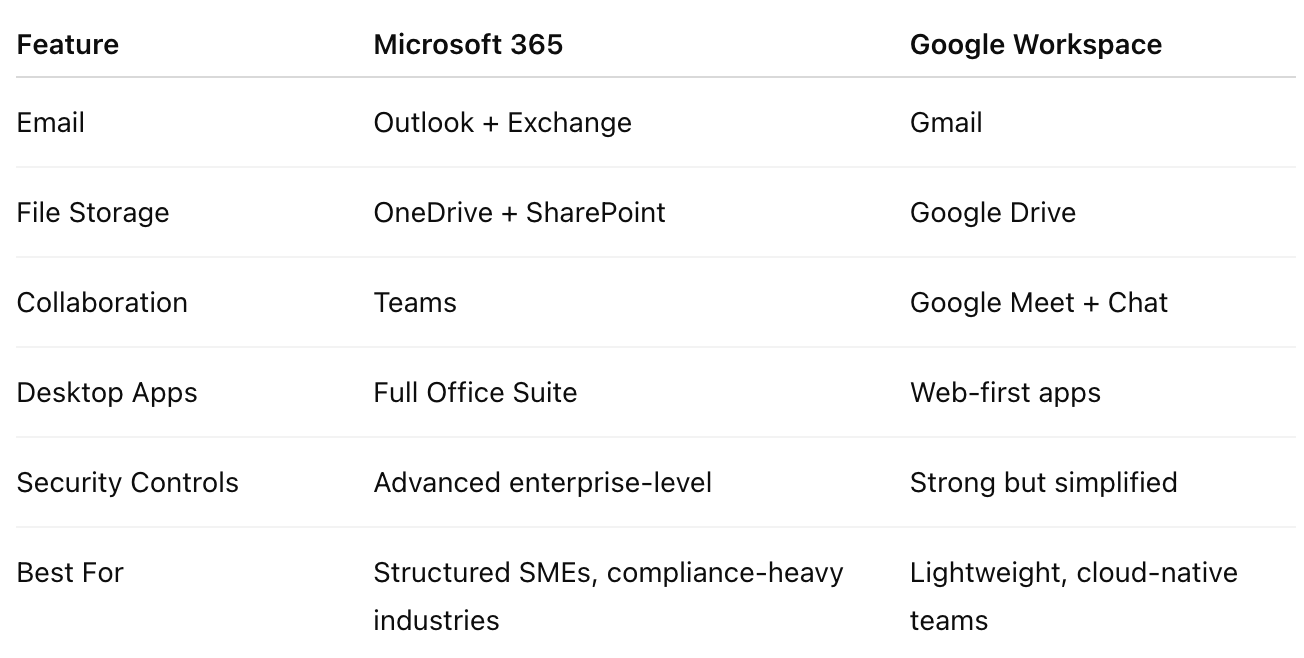
Both are powerful platforms, but they serve different business needs.
Why This Decision Matters for Singapore SMEs
Singapore businesses operate under:
PDPA compliance requirements
Growing cybersecurity risks
Multi-location expansion needs
Hybrid work expectations
Increasing audit scrutiny in regulated industries
Your productivity platform must align with these realities.
Security & Compliance: Which Is Stronger?
Microsoft 365
Microsoft 365 includes:
Conditional Access Policies
Advanced Threat Protection
Data Loss Prevention (DLP)
Retention policies
Advanced audit logs
Sensitivity labels
Role-based admin control
For clinics, law firms, accounting firms, and finance-related SMEs, this level of control is critical.
Google Workspace
Google provides:
2-Step Verification
Admin controls
Basic DLP (higher tiers)
Strong spam filtering
However, granular compliance configuration is generally more limited compared to Microsoft 365’s enterprise controls.
Winner for Compliance-Heavy SMEs: Microsoft 365
If you operate in: Healthcare, Legal, Finance, Government-linked sectors
Microsoft 365 typically provides stronger regulatory alignment for Singapore environments.
Desktop Experience vs Browser-First Model
Microsoft 365
Full desktop Word, Excel, and PowerPoint
Offline editing
Advanced Excel capabilities
Deep Outlook integration
Complex formatting reliability
Ideal for: Finance teams, Legal document-heavy firms, Data-heavy operations
Google Workspace
Primarily browser-based
Lightweight apps
Real-time collaboration simplicity
Less advanced Excel-like functionality
Better for: Startups, Marketing teams, Lightweight document workflows
File Management & Collaboration
Microsoft 365
SharePoint + OneDrive offer:
Structured folder permissions
Advanced sharing controls
Version history
Granular file access rules
External sharing governance
Best for organisations needing controlled document management.
Google Workspace
Google Drive offers:
Simpler sharing
Link-based collaboration
Easier real-time editing
But less robust hierarchical control for complex organisations.
Teams vs Google Meet
Microsoft Teams
Integrated with Outlook
Advanced meeting policies
Call recording controls
Deep integration with SharePoint & Planner
Enterprise telephony integration
Google Meet
Simple
Browser-native
Lightweight video conferencing
For structured SMEs, Teams usually scales better as the organisation grows.
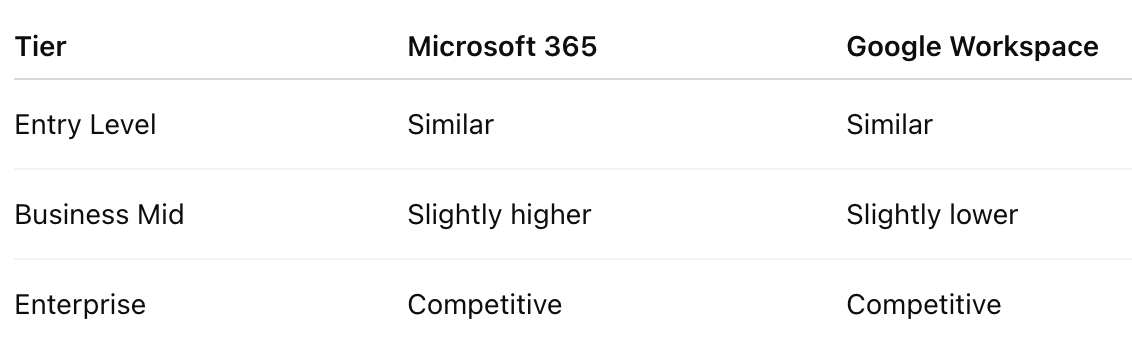
Cost Comparison in Singapore
Pricing evolves, but generally:
However… The Real Cost Isn’t Subscription, It’s Migration & Security Gaps
Businesses often switch because:
Google Workspace lacks advanced compliance features
File structures become messy over time
Excel-heavy workflows hit limitations
Security controls need upgrading
Scalability for Growing SMEs
When SMEs scale from:
10 users → 30 users
1 office → 3 branches
Basic admin → compliance-heavy operations
Microsoft 365 generally scales more seamlessly.
It integrates better with:
Azure Active Directory
Device management (Intune)
Endpoint security
Multi-branch infrastructure
Common Scenario in Singapore
We often see:
Startup begins with Google Workspace
Company grows
Compliance requirements increase
File management becomes messy
Excel limitations create workflow inefficiencies
Security team requests stronger controls
Business migrates to Microsoft 365
This is extremely common in law firms, clinics, accounting practices, and growing SMEs.
Industry-Specific Recommendations
Healthcare Clinics
Microsoft 365 is preferred due to: Audit trails, DLP policies, and Compliance structure
Law Firms
Microsoft 365 for: Document control, Version management, Email retention policies
Accounting Firms
Microsoft 365 for: Advanced Excel, Secure file governance
Creative / Marketing Teams
Google Workspace can be sufficient.
When Should You Migrate?
Consider migrating from Google Workspace to Microsoft 365 if:
You require structured permission control
You need better Excel functionality
Your business is scaling rapidly
Compliance obligations are increasing
You’re opening new branches
Security audits are becoming more frequent
Migration Considerations
Switching platforms involves:
Email migration
File transfer (Drive → SharePoint)
Calendar & contacts sync
DNS reconfiguration
Security reconfiguration
Staff retraining
Improper migration can cause downtime and data confusion. This is why many SMEs engage professional Microsoft 365 migration services in Singapore to ensure a smooth transition, from email migration to security configuration and post-migration support.
How Advance IT Helps Singapore SMEs Decide
At Advance IT, we don’t push platforms blindly.
We:
Assess your current workflows
Review compliance obligations
Evaluate growth trajectory
Analyse security posture
Provide an honest recommendation
If Google Workspace suits your business long-term, we’ll say so.
If Microsoft 365 provides stronger scalability and compliance alignment, we’ll design a structured migration plan.
We only take on projects where we can deliver long-term value.
Final Verdict
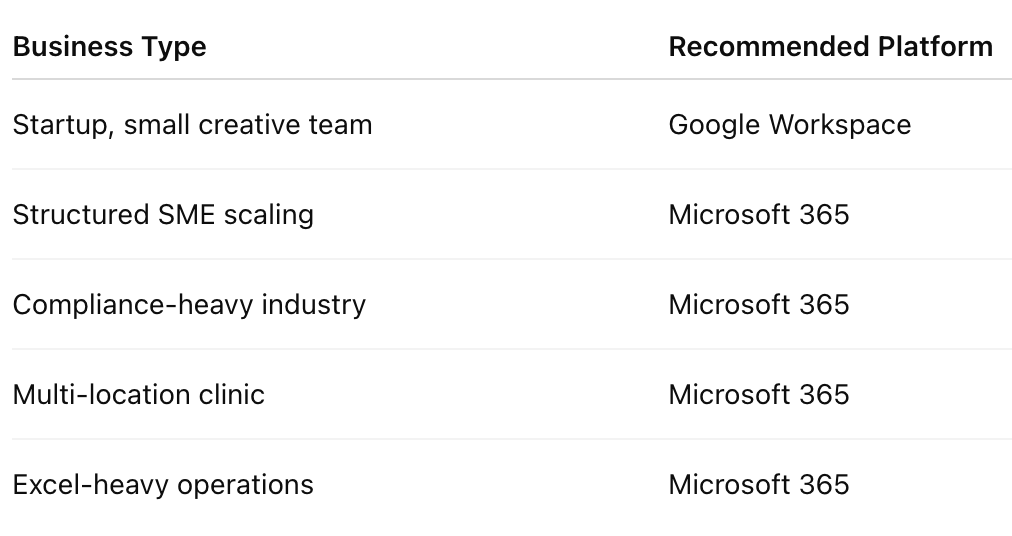
For most growing Singapore SMEs in regulated or structured industries, Microsoft 365 offers stronger long-term scalability, compliance, and operational control.
Not Sure Which Platform Fits Your Business?
We offer:
Platform comparison consultation
Security posture review
Compliance assessment
Migration feasibility analysis
No generic advice. Just practical, business-first recommendations.
Related Resources
The True Cost of Maintaining an In-House IT Department in Singapore (Read more)
Top Cost-Effective IT Solutions to Reduce Overhead Immediately (Read more)
How Leveraging IT Services Can Help Reduce Operational Costs in 2025 (Read more)
Cost Savings and Best Practices for Automating Routine IT Tasks (Read more)
Optimize Your IT Infrastructure with These Key Strategies (Read more)
Measurable Cost Reduction from ERP & CRM Systems (Read more)













Is your Singapore clinic ready for the Health Information Act? Learn the 2027 HIA deadline, NEHR requirements, cybersecurity rules and practical steps private clinics should take now.