

Quick Answer: Why Does Outlook Have Sync Problems With Gmail?
Outlook and Gmail can work together, but they are not the same email ecosystem.
Google provides Google Workspace Sync for Microsoft Outlook (GWSMO) to synchronise Google Workspace data with Outlook. However, Google itself documents that some Outlook features are unavailable or may not behave as users expect when Outlook is used with GWSMO.
Google also states that while email, calendar and contact information can be synchronised, some types of information are not synchronised or are handled differently between Google Workspace and Outlook.
This means an IT provider may be able to repair a damaged Outlook profile, rebuild a local cache or correct a configuration problem - but that does not necessarily eliminate the architectural limitations of using Outlook on top of Google Workspace.
For a business heavily dependent on Outlook, that distinction matters.
A Common Business Scenario: Google Workspace Email + Microsoft Outlook
Consider a Singapore recruitment company.
The company pays for Google Workspace and therefore has Gmail-based company email accounts.
However, its business development employees prefer Outlook because they prepare and send approximately 50-100 business emails per day.
Over time, staff begin reporting:
Emails created in Outlook take time to appear in Gmail.
Drafts created in Outlook do not always appear as expected in Gmail.
Outlook occasionally hangs or crashes.
Employees sometimes receive "cannot send" or similar sending errors.
Different computers have different Outlook versions.
Some accounts use different configurations or synchronisation methods.
Some employees eventually give up on Outlook and return to Gmail.
Staff workflows become inconsistent across the company.
The first reaction is usually:
"Can our IT provider fix Outlook?"
The better question may be:
"Are we using the right email architecture for the way our employees actually work?"
That is the question businesses should answer before spending more money repeatedly troubleshooting individual computers.
Why Outlook and Google Workspace Can Become Complicated
There are several layers between an employee clicking Send in Outlook and the message being stored in Google Workspace.
Depending on the company's configuration, Outlook may be connecting through:
Google Workspace Sync for Microsoft Outlook (GWSMO);
IMAP;
OAuth-based Google account connections;
local Outlook profiles;
PST or other local data;
different Outlook versions; or
different configurations inherited from previous IT setups.
The result can be a mixed environment in which one employee's Outlook behaves differently from another's.
Google's own documentation acknowledges that some Outlook functionality does not work exactly as it would in a native Microsoft environment.
For example, some Outlook features are unavailable or behave differently when Outlook is used with GWSMO. Google also documents that information that does not synchronise can remain specific to the computer on which it was created.
That becomes particularly relevant when staff work from multiple computers or expect Gmail and Outlook to behave as identical views of the same mailbox.
Is Delayed Outlook-Gmail Synchronisation Normal?
Some synchronisation delay is inherent to a synchronised environment.
For GWSMO specifically, Google's documentation states that different data types synchronise on different schedules. Email is synchronised frequently, while contacts, tasks, notes and other information can follow different intervals.
Therefore, "Outlook and Gmail don't update at the same moment" does not automatically mean the employee's computer is faulty.
However, substantial delays, missing information, repeated sending failures or Outlook crashes should still be investigated.
A technical assessment should determine whether the problem comes from the computer, Outlook profile, local storage, configuration, add-ins, network, Google synchronisation - or the way the overall environment has been designed.
Why Does Outlook Keep Hanging or Crashing?
Not every Outlook performance problem is caused by Google Workspace. Before recommending migration, an IT provider should investigate the affected devices.
Typical checks include:
Outlook configuration: Check which Outlook version is installed and determine how the Google Workspace account is connected.
Outlook profile: A damaged or problematic profile may cause unusual Outlook behaviour.
Local Outlook data: Large local mailboxes and data files can affect Outlook performance. Microsoft documents circumstances where large numbers of items or folders in Outlook data files can contribute to decreased performance.
Computer resources: Available storage, memory, Windows updates and the overall condition of the computer should also be assessed.
Add-ins: Third-party Outlook add-ins can introduce compatibility or performance problems.
Synchronisation: If GWSMO is being used, its synchronisation status and logs should be reviewed.
Google provides procedures for repairing or re-synchronising Outlook data when information is missing. However, Google also warns that re-synchronisation can take considerable time and resources.
This highlights an important distinction:
Repairing Outlook can solve a technical fault. It does not necessarily solve the reason the organisation keeps experiencing Outlook-Google compatibility and synchronisation problems.

Should You Keep Classic Outlook With Google Workspace?
For some businesses, yes.
If employees are happy with Gmail and Outlook is only occasionally required, maintaining Google Workspace may make perfect sense.
An IT provider may standardise affected computers, repair Outlook profiles and configure supported Google Workspace synchronisation consistently.
This can be the lowest-disruption option.
But consider what happens when Outlook is fundamental to daily operations.
If most employees want Outlook, the organisation repeatedly experiences synchronisation problems, and IT keeps having to maintain the connection between Google's email environment and Microsoft's desktop software, the company should assess whether maintaining that hybrid arrangement is still worthwhile.
What About Moving Everyone to New Outlook?
Changing the Outlook application alone should not be confused with changing the underlying email platform.
If the company's mailboxes remain in Google Workspace, moving from one Outlook experience to another does not automatically turn the environment into a native Microsoft 365 email environment.
This is why we would not recommend treating "install New Outlook" as the automatic answer to a company-wide Outlook/Gmail synchronisation problem.
The organisation should first decide which ecosystem it wants to standardise around.
What About Moving Everyone Back to Gmail?
This is technically one of the cleanest options if the company intends to remain with Google Workspace.
Instead of synchronising Google Workspace with another email client, employees can work directly within Google's environment.
The problem is workflow.
Imagine a recruitment or sales employee preparing dozens of personalised business emails every day. If that employee's established workflow depends on Outlook, forcing the employee into Gmail purely to avoid technical problems may reduce productivity.
Technology should support the company's workflow - not force every employee to develop workarounds around the technology.
If the organisation prefers Google's applications, optimise around Google Workspace.
But if the organisation already works primarily in Outlook, Word, Excel, Teams and other Microsoft applications, it may make more sense to examine whether the email system should also be standardised on Microsoft 365.
The Root-Cause Option: Migrate From Google Workspace to Microsoft 365
For businesses committed to Outlook, this is the option we would investigate most seriously.
Instead of maintaining: Google Workspace mailbox → synchronisation layer → Outlook → local computer
The organisation can move toward: Microsoft 365 / Exchange Online → Outlook
This does not mean Microsoft 365 can never experience Outlook problems.
It can. Computers can still have corrupted profiles, problematic add-ins, insufficient resources and other technical issues. The difference is that the company is no longer deliberately operating its primary Outlook workflow across two competing productivity ecosystems.
For businesses where Outlook is essential, this can simplify administration and provide a more standardised environment.
What Changes After a Microsoft 365 Migration?
A properly planned migration is much more than changing an email application. The existing Google Workspace environment must first be assessed.
That can include:
user mailboxes;
email addresses and aliases;
historical emails;
contacts;
calendars;
shared accounts;
distribution lists;
forwarding rules;
signatures;
Google Drive data where applicable;
DNS and mail-routing records;
mobile devices;
Outlook configurations; and
security and access requirements.
The Microsoft 365 environment can then be configured before the actual mailbox migration.
Once migration is complete, employees' Outlook applications are configured against the new Microsoft environment rather than continuing to depend on the previous Google Workspace-to-Outlook workflow.
The objective should be a controlled migration with minimal business disruption, not simply moving data from Platform A to Platform B.
Why This Matters Even More for Recruitment Companies
Recruitment companies routinely handle information that deserves careful protection.
Emails may contain candidate CVs, contact information, employment histories, salary information and other personal data.
Singapore's Personal Data Protection Commission states that organisations must make reasonable security arrangements to protect personal data in their possession or control against risks including unauthorised access, collection, use and disclosure.
Therefore, an email migration should also be treated as a data protection and security project.
Before providing administrator credentials or mailbox access to an IT vendor, businesses should understand:
who will have administrative access;
how credentials will be handled;
whether temporary accounts can be used;
what data technicians can access;
what security controls will be configured;
how access is removed after migration; and
what documentation will be provided.
For recruitment firms handling candidate and client information, these questions should form part of the migration plan-not an afterthought.
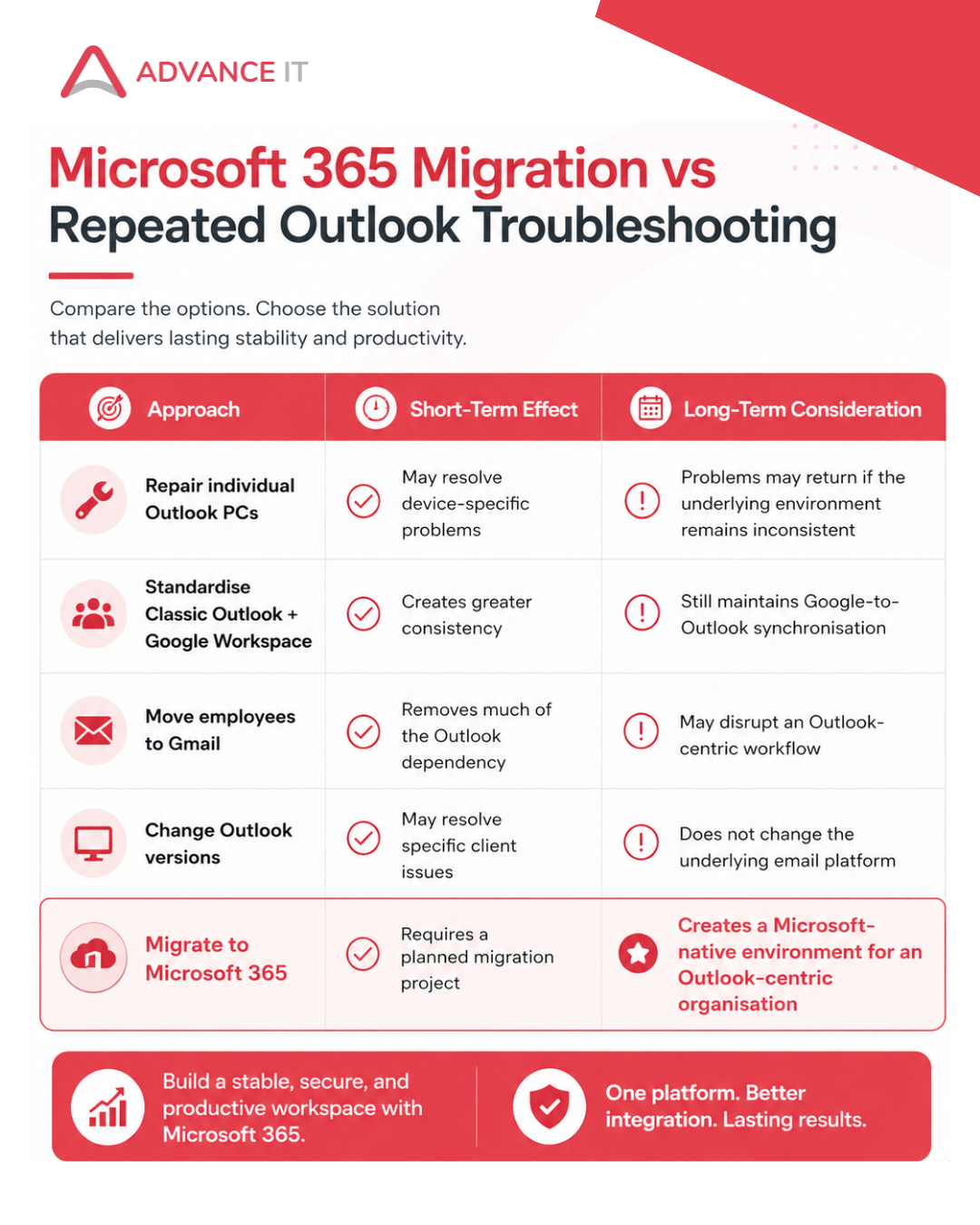
There is therefore no universal answer.
But if your company keeps asking its IT provider to "fix Outlook again", it may be time to stop looking only at individual PCs.
Look at the architecture.
When Should a Singapore Business Consider Migrating?
A Microsoft 365 migration should be seriously considered when several of these conditions exist:
Most employees prefer or require Outlook.
Outlook is important for sales, recruitment, or business development workflows.
Employees repeatedly experience Gmail/Outlook synchronisation problems.
Different computers use inconsistent Outlook configurations.
Employees switch between Gmail and Outlook because one application becomes unreliable.
Your IT provider repeatedly repairs profiles or synchronisation issues.
Your company already relies heavily on Microsoft Office applications.
Management wants a more standardised company-wide environment.
The organisation needs stronger central administration of email and user access.
One Outlook problem on one computer does not justify migrating an entire organisation.
Recurring problems across several employees are different.
That is when the organisation should compare the cost of continuing to maintain the existing setup against the cost and operational benefit of migration.
Before You Migrate: What Should an IT Provider Assess?
At Advance IT, we recommend assessing the current environment before proposing the migration scope.
For an Outlook/Google Workspace issue, this would typically mean reviewing:
1. Users and devices: How many employees and computers are affected?
2. Outlook versions: Are employees using the same Outlook version and configuration?
3. Connection method: Is each mailbox using GWSMO, IMAP, or another configuration?
4. Mailbox and local data: How large are the mailboxes and local Outlook data files?
5. Computer health: Are there storage, memory, update, or performance issues contributing to Outlook instability?
6. Existing Microsoft licences: Does the company already own Microsoft 365 licences that can be used or upgraded?
7. Google Workspace data: What email, calendar, contact and file data needs to be retained?
8. Security: How are administrator privileges, passwords, MFA and employee access currently managed?
9. Business continuity: When can the migration occur with the least disruption?
10. Post-migration support: Who will help employees reconnect Outlook, mobile devices and other applications after cutover?
Only after this assessment should the business receive a migration plan and quotation.
Can You Migrate Without Losing Existing Gmail Emails?
Yes - a properly designed migration should account for historical mailbox data.
However, businesses should not assume that every piece of information in one productivity ecosystem has a perfect one-to-one equivalent in another.
Google itself documents differences in how certain information and Outlook features synchronise with Google Workspace.
That is why migration planning should include a data assessment, testing and validation rather than simply creating new Microsoft accounts and asking employees to start using them.
Important mailboxes should be checked after migration to confirm that required business data is available.
Should You Cancel Google Workspace Immediately?
No. Do not cancel the existing environment before migration has been completed and verified.
A safer migration sequence is:
Assess → Plan → Prepare Microsoft 365 → Migrate → Validate → Cut Over → Support → Decommission
This reduces unnecessary risk.
The old platform should only be decommissioned after the required data and services have been confirmed in the new environment.
The Bottom Line
If one employee's Outlook crashes once, troubleshoot the computer.
If several employees repeatedly experience Outlook/Gmail synchronisation problems, inconsistent drafts, sending errors, and different configurations, investigate the environment—not only the individual PCs.
Google Workspace and Outlook can work together, and Google provides tools specifically designed to enable that.
But "it can work" and "it is the best architecture for our company" are two different questions.
For organisations whose employees depend heavily on Outlook, continually repairing a Google Workspace-to-Outlook setup may only address the symptoms.
Migrating fully to Microsoft 365 can address the underlying platform mismatch by standardising email and Outlook within the same Microsoft ecosystem.
That is especially worth assessing for Singapore recruitment, professional services, and other businesses where email is a core operational tool.
Experiencing Outlook and Gmail Sync Problems?
If your employees are dealing with:
Outlook freezing or crashing;
Gmail and Outlook drafts not synchronising as expected;
delayed emails;
sending errors;
inconsistent Outlook configurations; or
repeated Outlook repairs,
Advance IT can assess whether the problem should be repaired within your existing Google Workspace environment or whether your business would benefit from a planned migration to Microsoft 365.
We have encountered similar Outlook/Google Workspace issues across several client environments, so our approach starts by determining whether the issue is device-specific, configuration-related, or indicative of a need to standardise the company's email architecture.
Planning a Google Workspace to Microsoft 365 migration in Singapore?
Speak with Advance IT about your existing setup, number of users, and Outlook issues to determine the appropriate migration approach before making changes to your production email environment.
-
When Outlook is being used with a Google Workspace mailbox, information must be synchronised between the two environments. The exact behaviour depends on the Outlook version and connection method being used. A technical assessment should first determine whether the behaviour is caused by configuration, local Outlook data, synchronisation or a product limitation.
-
Yes. Google provides Google Workspace Sync for Microsoft Outlook (GWSMO), and Outlook can be used with Google accounts in supported configurations. However, Google documents that some Outlook functionality may not work exactly as expected and some data is not synchronised between the platforms.
-
Possible causes include Outlook profiles, local data files, add-ins, software versions, computer resources and synchronisation issues. The computer should be diagnosed before assuming that Google Workspace itself is responsible.
-
If Outlook is the organisation's primary email client, Microsoft 365 provides a more natively aligned Microsoft environment. Google Workspace can still be appropriate for organisations that primarily work through Gmail and Google's productivity tools.
-
Not necessarily. A single slow computer should first be diagnosed. Migration becomes more relevant when Outlook-related issues affect multiple employees, recur after troubleshooting, or when the organisation wants to standardise around Microsoft's ecosystem.
-
Advance IT can assess the existing environment and determine the appropriate migration approach based on users, mailboxes, data, security requirements and business continuity needs. The migration should be planned before changes are made to the company's production email environment.
-
It depends on the number and size of mailboxes, the data being migrated, network conditions, security requirements and the complexity of the existing environment. An assessment is required before providing a realistic migration schedule.
-
Historical email can generally be included within a planned migration, but the migration scope should explicitly identify which email, calendar, contact and other data needs to be retained and validated.
-
Normally, yes. A migration changes the underlying email platform; it does not necessarily require employees to change the company's domain-based email addresses. DNS and mail-routing records are updated as part of a properly planned cutover.
-
Changing platforms alone does not make an organisation PDPA-compliant. However, email systems containing personal data should be configured and managed with appropriate security arrangements, access controls and data-protection processes as part of the organisation's wider PDPA obligations.
····························································
With over 15 years of experience and a strong focus on IT support and Managed IT, we’re proud that 99.5% of our customers stay with us long-term.
‣ Website: https://www.advanceit.sg/
‣ Address: 8 Burn Road, #11-11 Trivex Singapore 369977
‣ Email us at: contact@advanceit.sg
‣ Call our team: +65 6592 8458
Related Reads
Optimize Your IT Infrastructure with These Key Strategies (Read more)
How to Build Scalable IT Infrastructure for Growing Businesses (Read more)
Effective Strategies for Setting Up IT Infrastructure for New Employees (Read more)
The Complete Guide to Managed Service Providers (MSPs): How They Benefit SMBs and SMEs (Read more)
How Leveraging IT Services Can Help Reduce Operational Costs in 2025 (Read more)
What is the Difference Between Managed IT Support Services and Traditional IT Support? (Read more)




















Compare all 5 Cyber Trust Mark tiers in Singapore, from Supporter to Advocate, and see which tier may fit a solo GP, group practice or specialist clinic.